tp
Project Portfolio Page (PPP)
Overview
FlashBang is a CLI app designed to provide students with a smart way of studying for their modules. The app will manage a limited number of flashcards for a small number of modules, optimized for users who prefer a CLI.
Summary of Contributions
Code Contributed
Enhancements Implemented
- Command Classes:
- How: Implemented classes such as
AddCommand,DeleteCommand,FlashBangCommand, etc.
- How: Implemented classes such as
- Command Class Testing:
- How: Used JUnit framework to write tests covering different scenarios and edge cases.
- Show FlashBang Percentage:
- How: Added methods to calculate and display the percentage based on user performance.
- Show FlashBang Mistakes:
- How: Implemented methods to track incorrect answers and present them to the user.
Contributions to User Guide (UG)
- Wrote feature sections:
add,delete,flashbang- Add: Detailed instructions on how users can add new flashcards.
- Delete: Explained the process for removing flashcards.
- FlashBang: Provided a comprehensive guide on using the flashbang feature.
Contributions to Developer’s Guide (DG)
- Wrote ‘Parser component’ section:
- Explained the role and functionality of the parser in interpreting user commands.
- Made Parser Partial Class Diagram:
- Created a visual representation of the parser structure.
- Made Parser Delete Sequence Diagram:
- Illustrated the sequence of operations for the delete command.
Contributions to Team-Based Tasks
- Conducting Code Reviews and Providing Feedback
- Maintaining the Issue Tracker
- Updating User Docs
Review/Mentoring Contributions:
Contributions Beyond the Project Team
Bugs reported in other team’s products
DG Extract
Structure
Below is a partial class diagram showing the interactions of the Parser class.

The sequence diagram below illustrates the interactions taking parseCommand(“delete --m cs2113 --i 1”) as an example.
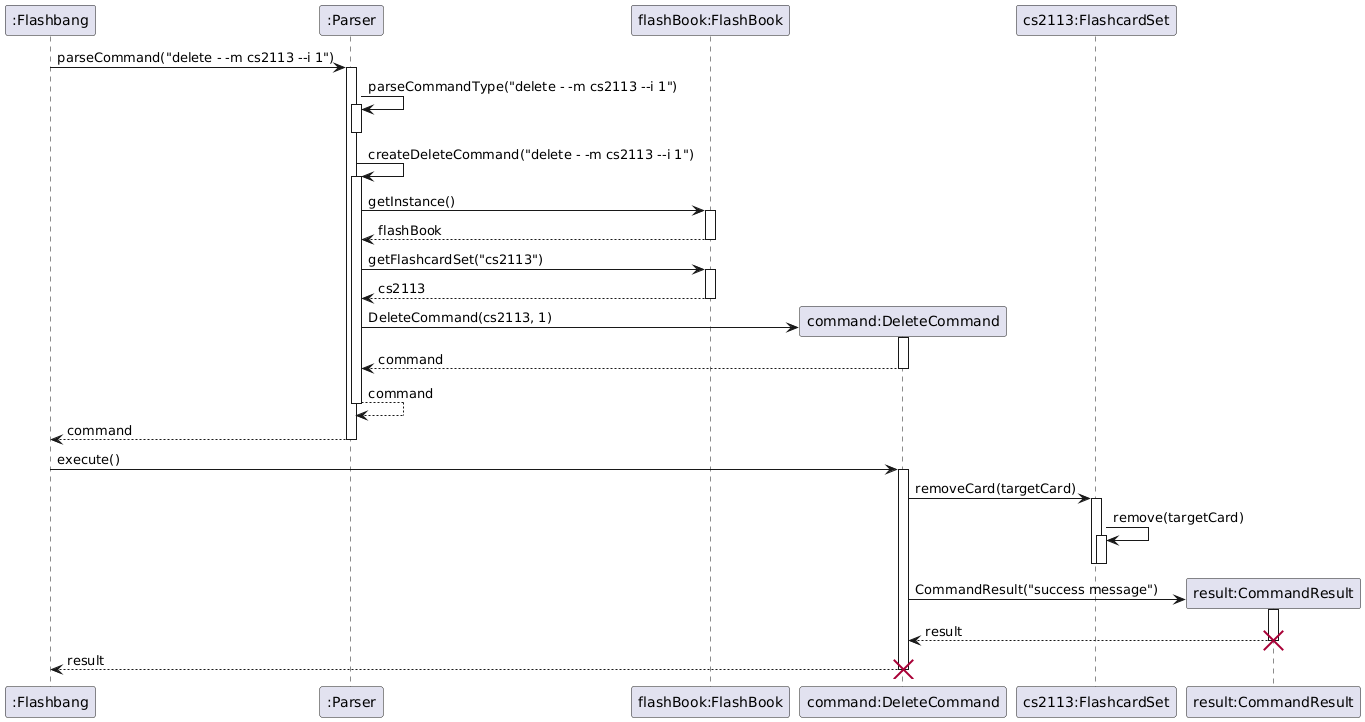
Example
How the Parser component works:
- The
Parserreceives the command input. - It identifies the command type using
parseCommandType. - Depending on the command type, it creates the corresponding command object (e.g.,
AddCommand). - The created command is executed, producing a
CommandResult. - The
CommandResultis then used byUito provide feedback to the user.